(Topic Last Updated On: 05/05/2010)
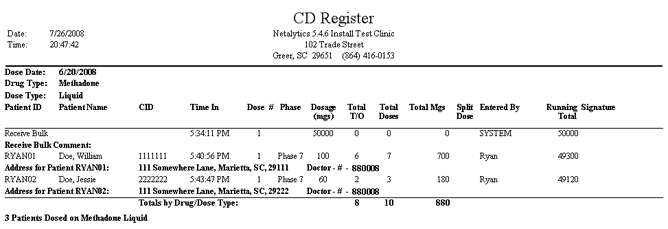
This report is similar to the Dosing History and Total Dispensed by Day reports, but is formatted specifically for facilities operating in the UK to meet specific requirements. This report displays all dosing transactions recorded over a selected date range, as well as inventory shipments added on the Add Bulk Inventory screen. This report displays much of the same information as other dispensing records, but also includes each patient's full address and prescribing doctor's prescriber number. The 'Running Total' column tracks a running total of remaining bulk inventory in the bottle being dispensed from. This report is generally printed at the end of each dispensing date, and serves as the formal hard copy record of dispensing activity once signed by dispensing personnel.
Patient ID
This column displays each patient's 'Patient ID' number, as stored for each patient on the Patient Profile screen. 'Receive Bulk' appears in this column to note bulk shipments added on the 'Add Bulk Inventory' screen.
Patient Name
This column displays the full name of each patient who received medication.
CID
This column displays each patient's 'State ID (CID)' number, as stored for each patient on the Patient Profile screen.
Time In
This column displays the time each dosing transaction was recorded in the system.
Dose #
This column displays the dose number for the dose or doses recorded. Dose #1 is the default dose number for each patient's dose, but additional doses given for the same take-on date (e.g., split-dosers) are numbered Dose #2 and up. Exception doses (e.g., additional intake mgs) are also often indicated as Dose #2 or higher.
Phase
This column displays each patient's 'Phase Type', as stored for each patient on the Dosing Information screen.
Dosage (mgs)
This column displays the mg amount of medication dispensed for each dosing transaction. For 'Receive Bulk' transactions, the amount of mgs received appears in this column.
Total T/O
This column displays the total number of doses taken out of the facility by each patient for each dosing transaction.
Total Doses
This column displays the total number of doses administered to each patient for each dosing transaction.
Total Mgs
This column displays the total amount of mgs administered to each patient for each dosing transaction.
Split Dose
This column displays an 'X' for each transaction entered for a patient who is a split-doser, indicated on the Dosing Information screen.
Entered By
This column displays the 'Employee ID' (User ID) of the user who entered each dosing transaction in the system.
Running Total
This column displays a running total of the amount of mgs remaining in the bulk bottle from which dispensing transactions are being recorded.
Signature
This column displays each patient signature recorded in facilities requiring patients to sign for doses on an electronic signature pad.
Dose Date
This field serves as a header, and displays the date on which each of the dosing transactions displayed below were recorded.
Drug Type
This field serves as a header, and displays the 'Drug Type' of each dosing transaction displayed.
Dose Type
This field serves as a header, and displays the 'Dose Type' of each dosing transaction displayed.
Receive Bulk Comment
This field appears beneath each 'Receive Bulk' transaction appearing on the report, and displays any text entered into the 'Additional Bottle Information' field when each shipment is entered on the Add Bulk Inventory screen.
Address for Patient (Patient ID)
This field appears beneath each dosing transaction and displays each patient's 'Patient' address as entered on the Addresses window, which is accessed from the Patient Profile screen.
Doctor - #
This field appears beneath each dosing transaction following each patient's address, and displays the 'Prescriber #' (Clinic Doctors screen) of the 'Doctor' selected for each patient's prescription (covering the doses received) on the Prescription Information screen.
Totals by Drug/Dose Type
This field displays the totals for the 'Total T/O', 'Total Doses', and 'Total Mgs' columns for each drug/dose type combination dispensed.
____ Patients Dosed on (Drug Type/Dose Type)
This field displays the total number of patients medicated with each drug/dose type combination for each 'Dose Date'.
From Date
This parameter allows users to limit the report's data to only display dosing and inventory transactions entered on or after the date selected here.
To Date
This parameter allows users to limit the report's data to only display dosing and inventory transactions entered on or before the date selected here.
Dispensed By
This parameter allows users to limit the report's data to only display dosing and inventory transactions entered by the user selected here.
Workstation
This parameter allows users to limit the report's data to only display dosing and inventory transactions entered on the computer workstation selected here. Available options include the names of all computer workstations in your facility.